ADS 1103 Gateball League β — English Guide
- Overview
- Current Settings
- Registration
- Match Procedure
- Rankings and Match Records
- Prohibited Conduct
- Reports and Support
Overview
ADS 1103 Gateball League β (AGBL β) is a trial system for running an always-on rated league on ADS.
Players use Discord to register, find opponents, and report match results. Matches are played in private rooms on ADS.
AGBL β is separate from the regular random matchmaking system. It is intended for players who want matches where ratings, rankings, wins, and losses matter.
Because AGBL β is currently in trial operation, its settings and procedures may be changed depending on participation and matchmaking activity.
Important:
The Discord bot interface is currently available only in Japanese.
This guide includes the exact Japanese labels shown in the interface.
Current Settings
| Item | Setting |
|---|---|
| Initial rating | 1500 |
| Matchmaking range | No restriction |
| Rematch against the same opponent | Available after playing 2 matches against other opponents |
Players who are waiting and fall within the permitted rating range are matched automatically.
When no eligible opponent is available, you will remain in the matchmaking queue.
Registration
To participate in AGBL β, you must first register through the Discord server.
Registration is linked to your Discord account. However, your entry name does not need to match your ADS player name or Discord display name.
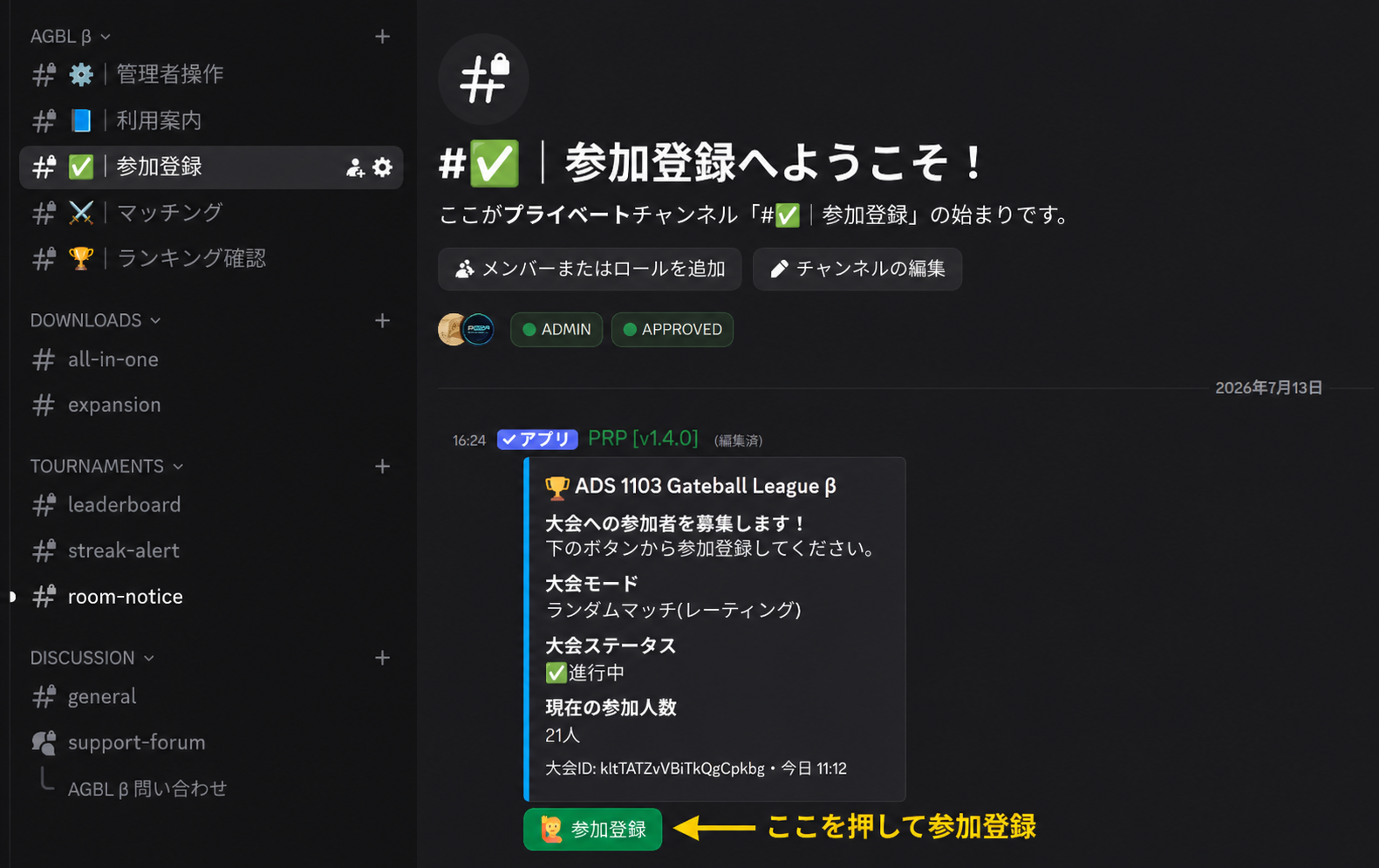
Open the ✅|参加登録 channel and press:
参加登録
Registration
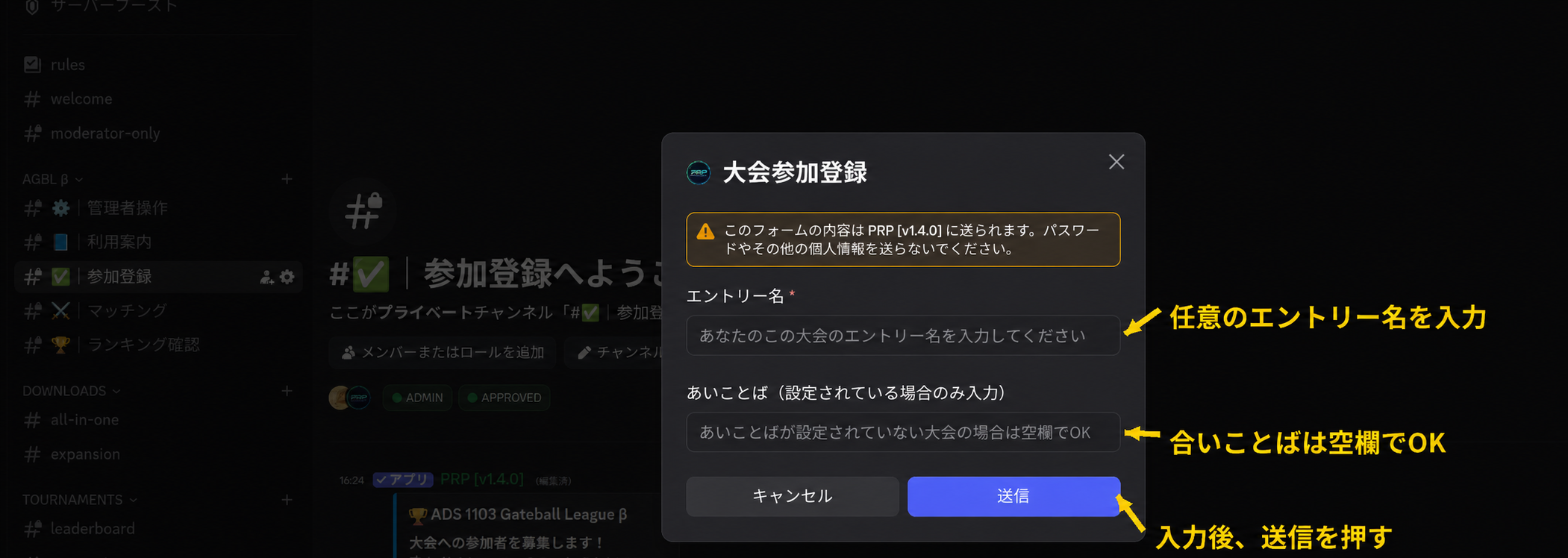
When the registration form appears, enter your desired name in:
エントリー名
Entry Name
Then press:
送信
Submit
The あいことば field is not currently used, so leave it blank.
Registration Notes
- You may choose any entry name
- Registration is linked to your Discord account
- Names that violate the Community Guidelines are not permitted
- Registration generally cannot be cancelled after completion
Match Procedure
After registration, use the ⚔️|マッチング channel to enter the matchmaking queue.
1. Enter the Matchmaking Queue
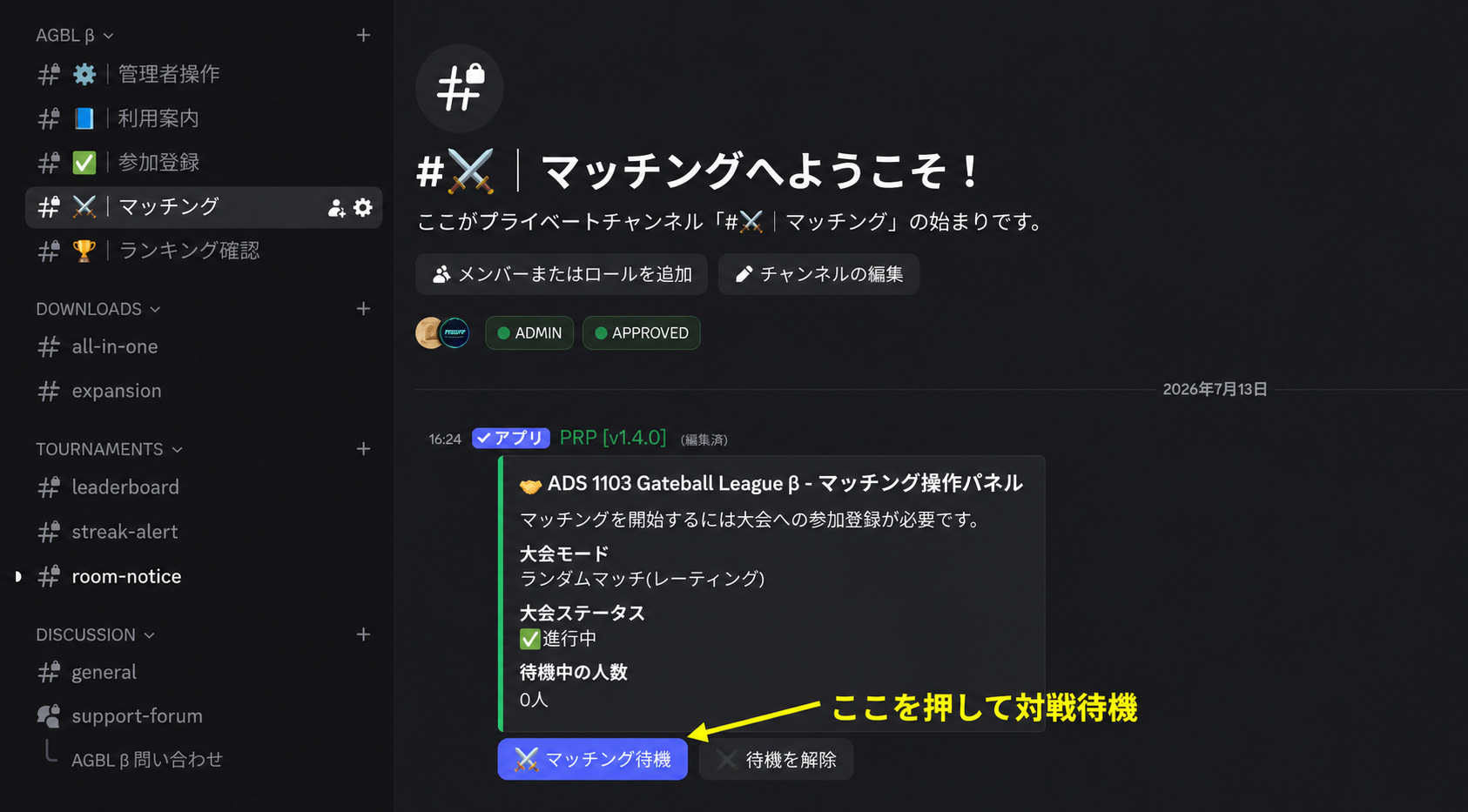
Open the ⚔️|マッチング channel and press:
マッチング待機
Enter Matchmaking Queue
When leaving your device or becoming unavailable, press the following button before a match is found:
待機を解除
Leave Matchmaking Queue
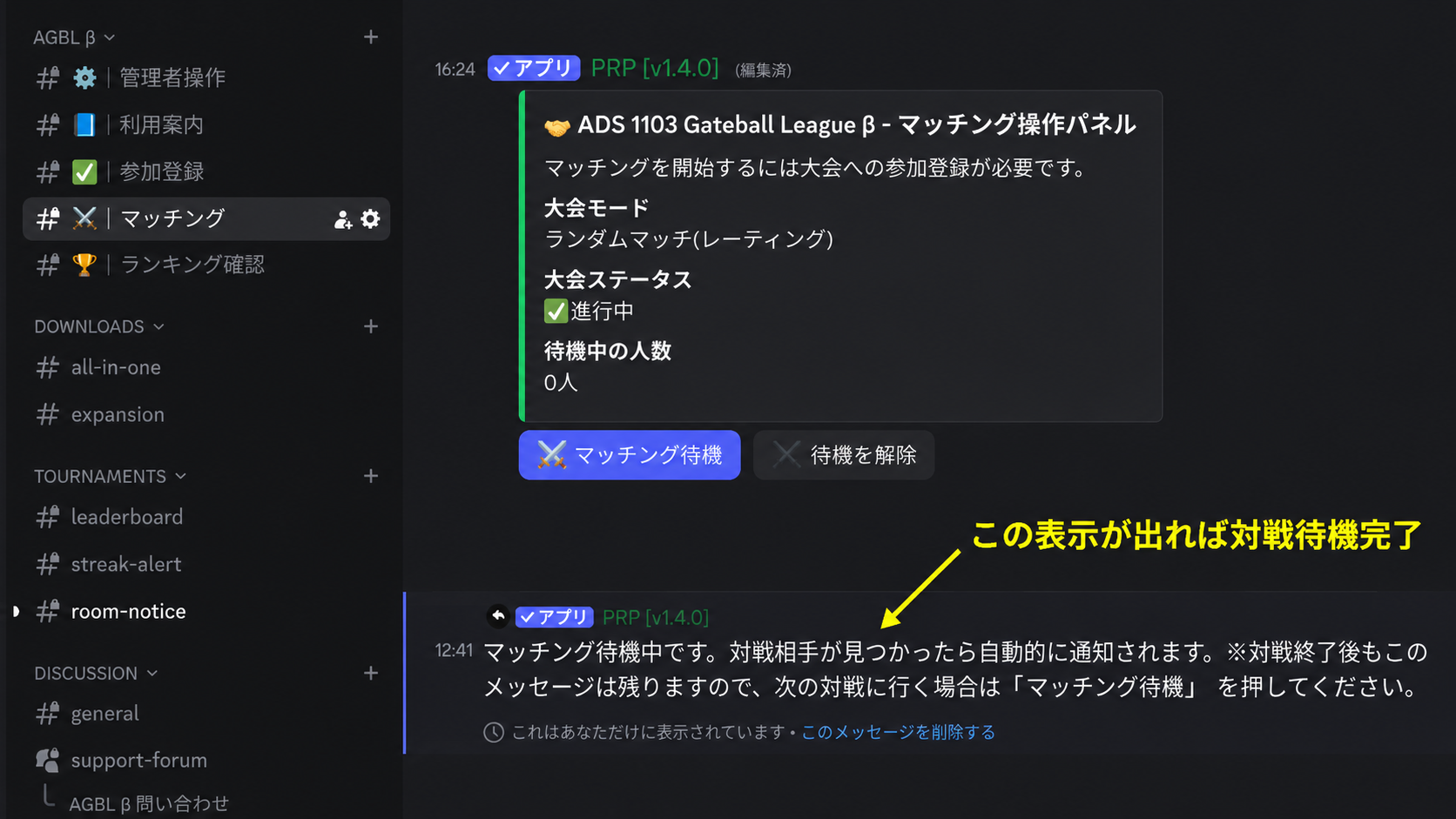
When this message appears, you have successfully entered the queue.
You will be notified automatically when an opponent is found.
Matchmaking Notifications
When at least one player enters the queue, a notification is posted in the 🔥|待機通知 channel.
🔥 狼煙が上がりました
A signal fire has been raised — a player is waiting
When no players remain in the queue, the same message is updated to:
🌫️ 狼煙が消えました
The signal fire has gone out — no players are waiting
You may enable notifications for the 🔥|待機通知 channel to be notified when a player begins waiting.
A waiting player may still be outside your permitted rating range.
2. Open the Private Match Thread
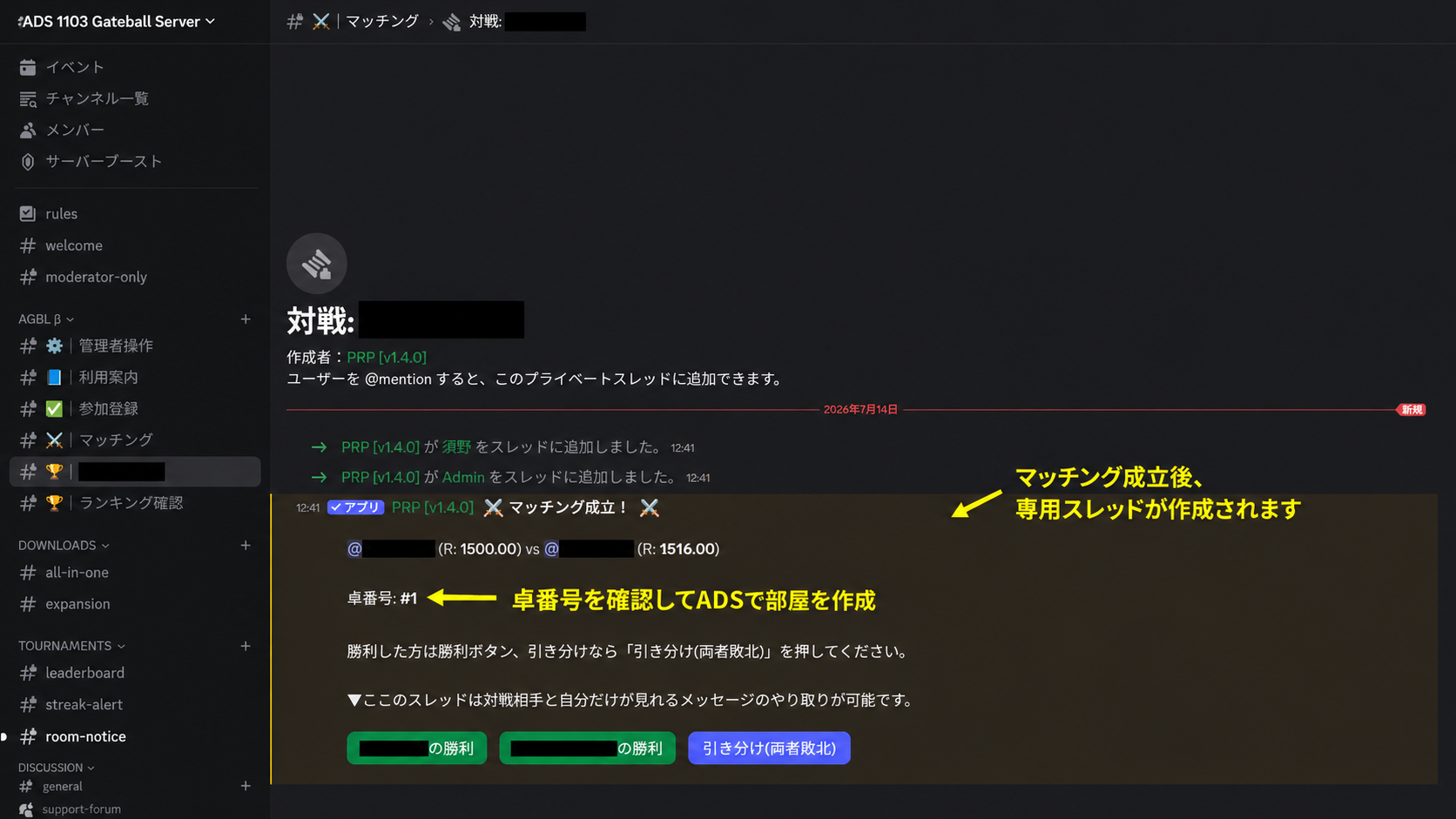
When matchmaking is successful, a private thread for the two matched players is created automatically.
The thread displays a table number:
卓番号
Table Number
Confirm this number before opening the room on ADS.
3. Create a Room on ADS
After matchmaking, decide which player will create the room.
The player creating the room should first notify the opponent in the private thread, then enter ADS.
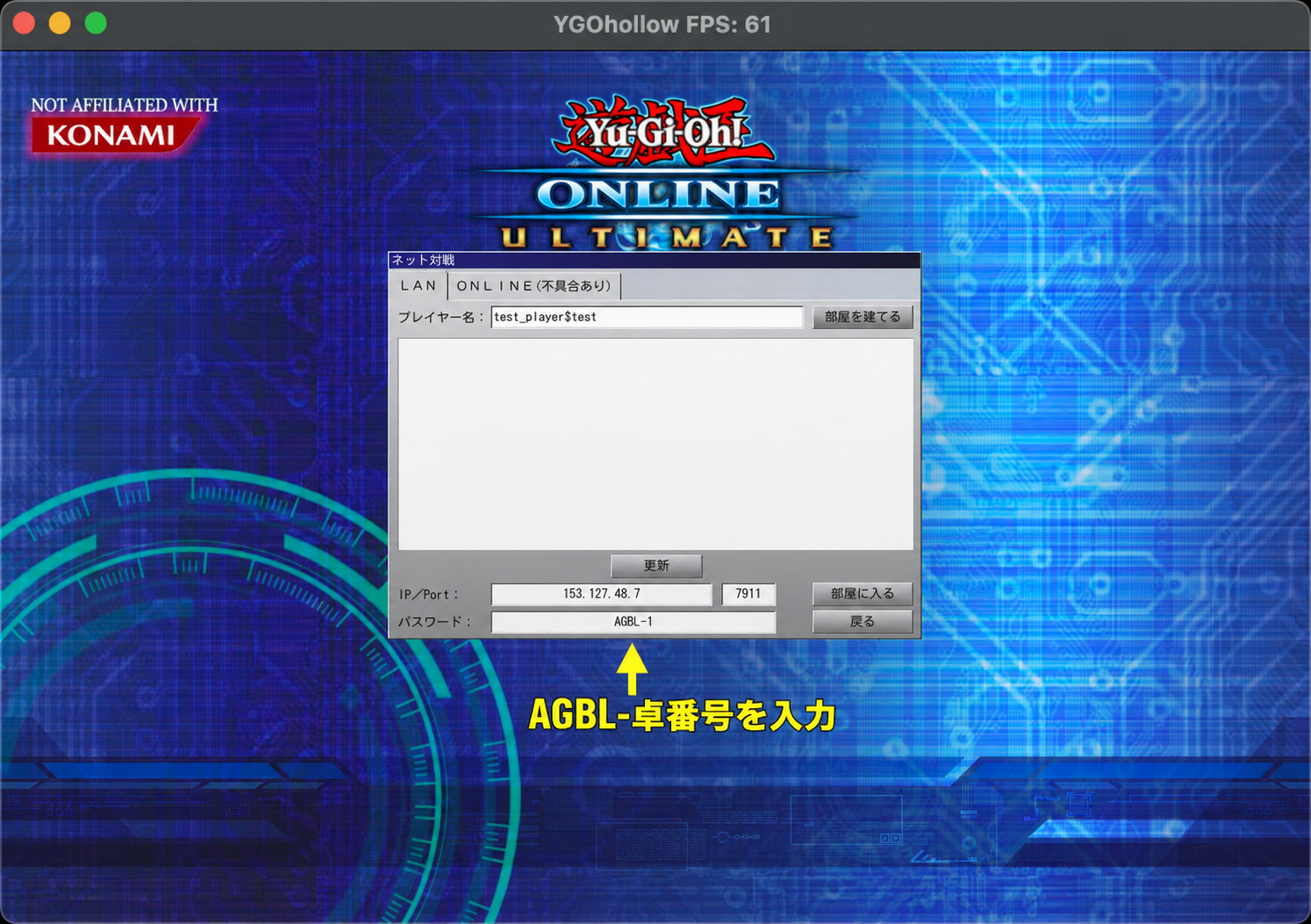
In the ADS パスワード field, enter the following:
AGBL-TableNumber
For example, if the displayed table number is 1, enter:
AGBL-1
Both players must enter the same password.
4. Report the Match Result
After the match, the winner must press the victory button displaying their own name in the private thread.
For a draw, select:
引き分け(両者敗北)
Draw — Both Players Receive a Loss
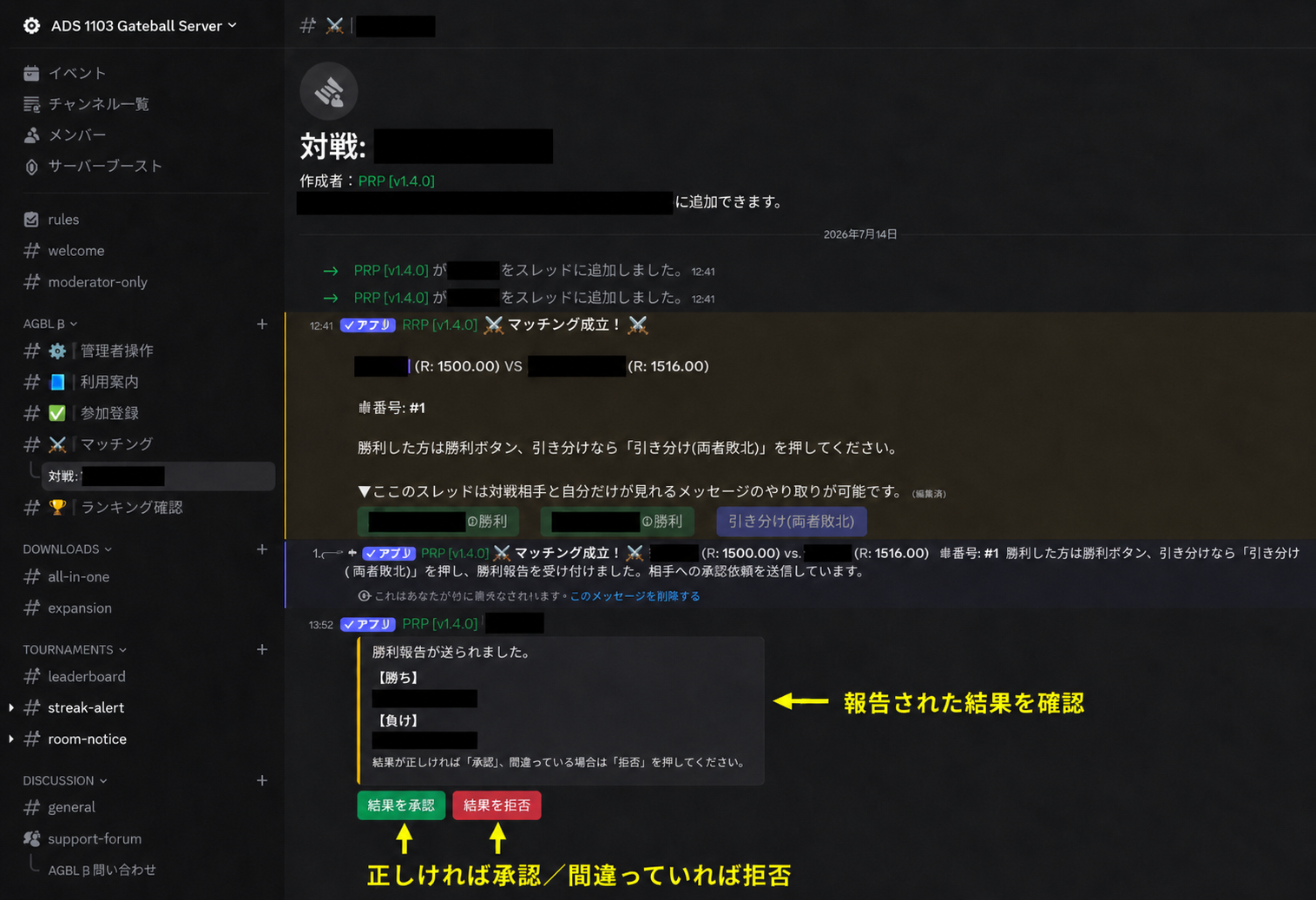
After the result is reported, the opponent receives a confirmation message.
The losing player should review the result and press:
結果を承認
Approve Result
when the report is correct, or:
結果を拒否
Reject Result
when the report is incorrect.
5. Result Confirmation
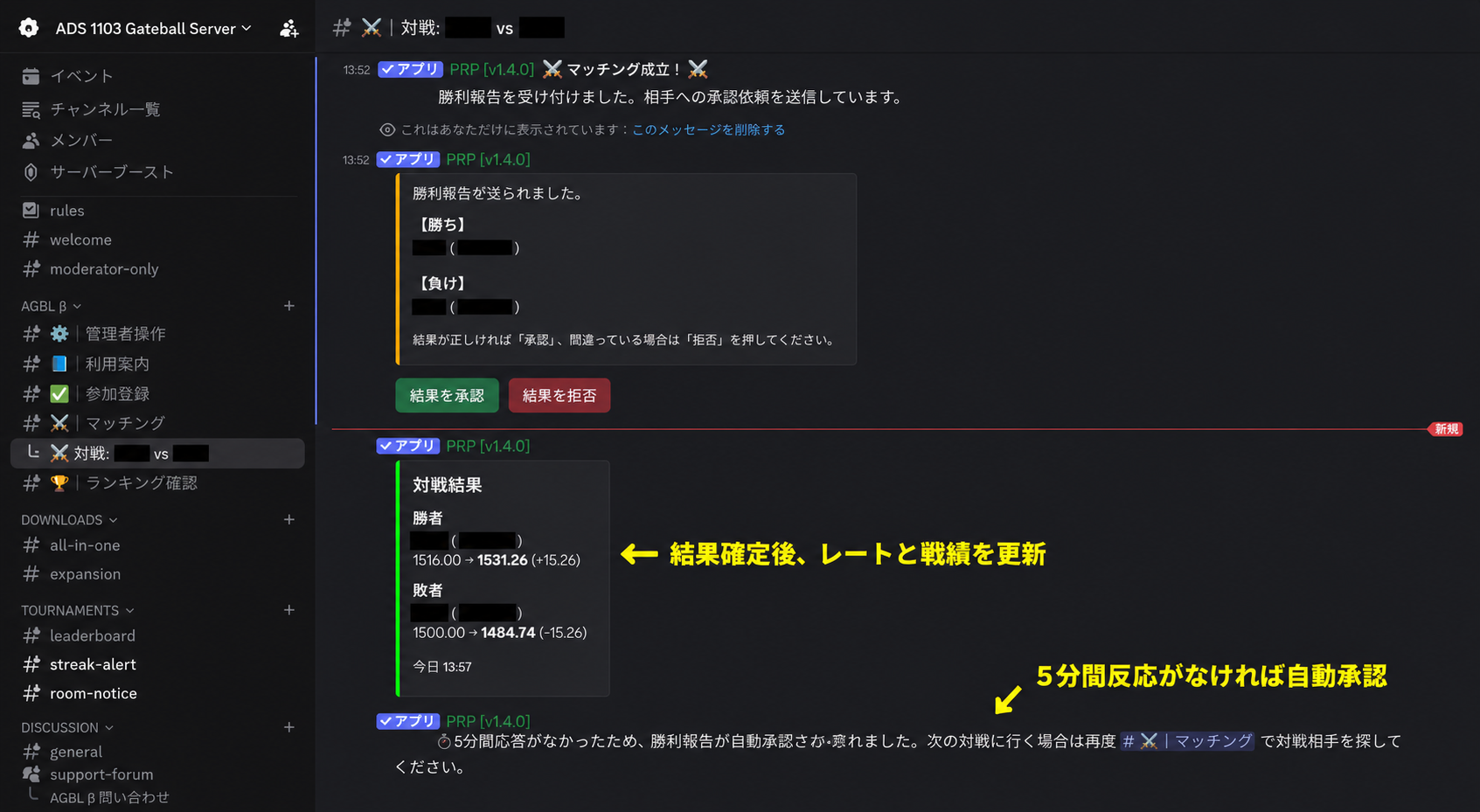
After approval, the result is finalized and both ratings and match records are updated.
When neither approval nor rejection is submitted within 5 minutes of the result report, the result is approved automatically.
Match Conduct
- After matchmaking, mention your opponent in the private thread
- When you create an ADS room, tell your opponent in the thread
- If there is no response and the opponent does not enter the ADS room within 5 minutes after being contacted, report a walkover win
- A player who returns late may not reject a legitimate walkover report
- When unavoidable circumstances occur, do not argue with the opponent; report the issue to the administrators
Rankings and Match Records
Open the 🏆|ランキング確認 channel to view the public rating ranking.
The public ranking displays up to 10 players whose ratings are above 1500.
Players rated 1500.00 or below, and players outside the public top 10, are not displayed.
To view your own information, press:
現在の成績と対戦履歴
Current Record and Match History
A private thread will be created for you.
The private thread displays:
- Your current rank
- Your current rating
- Your overall record
- Your match history
To retrieve the latest information, press:
最新の情報に更新
Refresh to the Latest Information
Your detailed rank and match record are visible only to you.
Prohibited Conduct
The ADS Community Guidelines also apply to AGBL β.
The following conduct is specifically prohibited:
- Reporting a victory before the match result has been decided
- Reporting a victory during an ongoing match in an attempt to exploit automatic approval
- Submitting a false walkover report
- Collusion or deliberate rating manipulation
- Participating through multiple accounts
- Impersonation, insults, intimidation, or harassment
- Remaining in the matchmaking queue while unavailable
- Any other conduct that violates the Community Guidelines
When a false report or abuse of the automatic approval system is confirmed, the administrators will correct the result.
Serious violations may result in suspension from AGBL β or suspension from ADS.
Reports and Support
To report violations, suspicious activity, or problems that cannot be resolved between the players, contact us through support-forum or contact admin.
Please include information identifying the relevant match or thread and a clear explanation of the issue.
Immediate administrator response is not guaranteed.
PRP Instructions
AGBL β uses the Discord rating tool Pocket Rating Platform(PRP) for matchmaking and result reporting.
For general information about PRP, refer to the following documentation:
Pocket Rating Platform User Guide — Japanese
When the general PRP documentation differs from this AGBL β guide or instructions given by the administrators, follow the AGBL β guide and administrator instructions.